
Stop sending proposals into the dark.
Send a branded link and see the moment a client opens it, which sections they read, and when they sign. Keep a clean PDF for whoever still needs a file.

Prepared for Ember & Oak Roasters
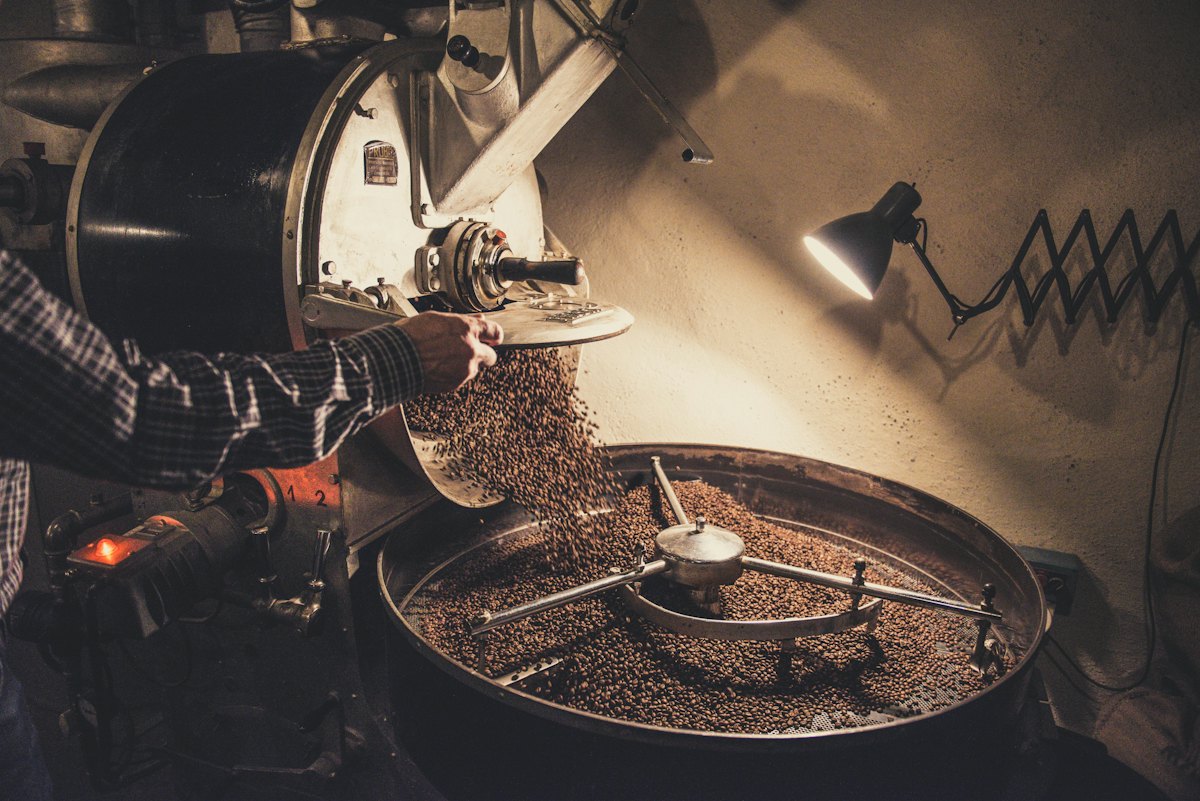
A 5-week production window covering pre-production, one roastery day, one day across both cafes, one location day, and a full post-production cut: packaging imagery, retail and barista stills, paid social, and a 45-second launch film for the Yirgacheffe winter release.
Ember & Oak has a winter single-origin release that deserves imagery it isn't currently getting. The bags are beautifully printed, the story behind the Yirgacheffe lot is real, and the Division cafe has the light a photographer dreams about. The photography running on the site and the wholesale line sheet was shot in 2023 on a flat-lay rig that flattens all of it. We've seen the packaging. We've been to Division on a Wednesday morning. The coffee is doing more work than the pictures of it.
Your packaging is better than the pictures of it
The winter Yirgacheffe release has the strongest material story you've shipped: the foil-stamped ember motif, the oak-grain emboss on the side panel, the cream-tinted interior that shows when the bag opens. Flat-lay product shots can't show any of it — the catch of light on the foil, how the emboss reads at an angle, how the color shifts under shop lighting versus daylight. None of that survives a white sweep. Your wholesale line sheet is converting roughly 40% below the summer catalog, and the winter designs are objectively more considered. The bags are better. The pictures are worse.
At your scale, good production is tight. Smaller crew, clearer shot list, fewer negotiables on the day. That's the work we do best, and it saves you money without cutting quality.
Pre-Production (Weeks 1–2)
Two calls and a creative document. Call one is the working session: we walk the new bag, go through the cupping notes, pick the hero moments (the pour, the grind, the bag on the shelf at Division), build a shot list and a mood reference, and agree on the feel (cool morning daylight, warm interior, specific shadow treatments). Call two is logistics: roastery access windows, cafe scheduling around trading hours, location scouting, crew confirmation, and the final shot list you sign off on before we invoice the first deposit. The creative document is 8 pages; it's everything the team needs to walk onto set and know what we're making.
Pre-Production
- Creative development session (1 day, in-person at Division or remote)
- Shot list and creative document (8-page PDF)
- Location scouting and confirmation
- Crew confirmation and call sheets
- Model release coordination for featured baristas and customer shots
Prepared and signed by
Signing here tells Helena Eagan you're ready to proceed. Your name will be recorded alongside this proposal along with the time and a snapshot of what you accepted.
Prepared and signed by
Accepted by

I just launched ProposalKit, so I'm building it around the people using it. If it's missing something your proposals need, tell me and I'll make it happen.
Silver
Founder, ProposalKit
What you'll know about every proposal
What does the client see first?
Your proposal as a web page, instead of a PDF. Clients click a link and land on a web page with your cover, sections, and pricing. No PDF viewer, no sign-in, and a PDF is one click away if they want one.
Did they read it, or skim?
See whether your pricing got read. Every proposal shows opens, return visits, and how long someone sat on each section, so your next message is based on behavior instead of guessing.
Can they sign without a PDF?
Let the client accept where they are reading. The signature sits inside the proposal itself, with the signed record captured at acceptance. No printing, scanning, or DocuSign round-trip.
Free to use. One plan to upgrade.
The full editor, branded client links, in-page signatures, and PDF export are free. Pro tracks every link and adds deep read analytics.
Free
The full editor and hosted links, with tracking on one active link at a time.
- Unlimited branded web proposals
- All templates and industry presets
- AI editing assist and brand customization
- PDF export
- Tracking on 1 active link
- Viewed notifications
Pro
Every link tracked, deep read analytics, and client acceptance.
- Everything in Free
- Tracking on every link you publish
- Per-section dwell time analytics
- Session drill-down and daily activity
- Client acceptance with signature
- Acceptance certificate PDF
- Priority support (24hr response)
No card upfront. Shared proposals stay live for clients on every plan.
Frequently Asked Questions
The proposal workflow questions that usually come up first.
Is this better than just sending a PDF?
A PDF can look fine, but once it is attached to an email you lose the thread: whether the client opened it, came back to it, read pricing, or is ready to sign. ProposalKit keeps the proposal as a branded client page first, then gives you a clean PDF when a file is needed.
Do my clients need an account to view or sign?
No. Clients open a private link in the browser, read the proposal, and can accept it on the page without creating an account or installing anything.
What can I see after the client opens it?
You can see opens, return visits, first and last viewed times, and which proposal sections held attention. Pro adds deeper section dwell analytics and session detail for teams that want more follow-up signal.
What happens when the client accepts?
The accepted proposal is locked with the client's typed signature, timestamp, and a snapshot of the proposal they accepted. You can export a signed PDF with the acceptance record for your files.
What if procurement or the client still asks for a PDF?
Export one. The web proposal is the main version, but PDF export is built into the workflow so you can forward, archive, or send a signed copy without rebuilding the proposal somewhere else.
Is this proposal software or a full proposal-management suite?
It is focused proposal software for agencies and service businesses, not a heavyweight proposal-management suite. ProposalKit covers the proposal workflow itself: write, send as a branded client link, track views, collect in-page signatures, and export clean PDFs. It is not a CRM, an RFP-response system, or a sales-governance platform.
Do I have to write proposals from scratch?
No. Start from the proposal structure, examples, and copy you already have from the sales conversation. AI Assist can tighten sections, fix grammar, expand rough bullets, or rewrite your wording with more confidence, but you stay in control of the project details and pricing.
Is there a free plan?
Yes, and it isn't a trial. The free plan includes the full editor, branded links, and PDF export, with tracking on one active link at a time. Pro is $15/month and tracks every link you publish, with deep read analytics and client acceptance. Proposals you've shared stay live for clients on either plan.
Questions, feedback, a feature idea, or just want to say hi?
Email us at [email protected]We read every message and love hearing from you.
Send the proposal with less guesswork.
Build it once, share the link, see what happened, and let the client accept on the page. Keep the PDF for the people who still need it.
Start FreeNo credit card required • Free plan included • Cancel anytime