
Google Docs vs ProposalKit
The proposal is solid. The PDF still looks like a Word doc.
Last updated: September 30, 2026
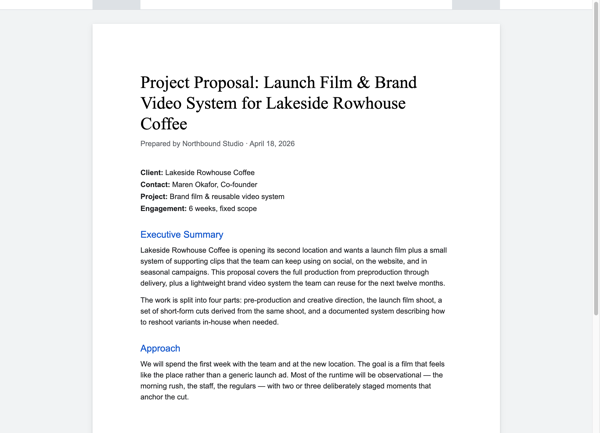

Google Docs is often a good place to start a proposal. It is familiar, usually already part of the working stack, and strong for internal review. If the proposal is occasional or mostly a written memo, a maintained Docs template may be enough.
Some agencies look elsewhere when the writing is not the problem anymore. The scope is clear. The price is clear. The client may even be ready. The friction is not that Google Docs is bad at documents. It is that a proposal has a job after the writing is done.
If that is the problem, the comparison is mostly about presentation and handoff.
Is Google Docs good for proposals?
Google Docs is popular because it solves problems people have.
It is excellent for collaboration. Comments, suggestions, action items, and version history make it a natural place to review language before anything reaches a client.
It is also cheap and familiar. A small team may already pay for Google Workspace, and many users can create Docs for personal use without a new software bill.
It supports reuse, too. Teams can maintain proposal templates and use copy links so the original file is not edited by mistake.
And yes, a Google Doc or exported PDF can be fully client-facing. Plenty of serious work closes that way.
A branded proposal page at the client's link
The first change is visual. ProposalKit gives the client a branded proposal page instead of asking the PDF to carry the whole experience.
Google Docs has a template gallery, and a copy-link workflow can carry an agency a long way. ProposalKit takes the same idea further: every proposal starts from the same set of sections in the editor, and the client's link opens a live page rather than a styled PDF underneath it.

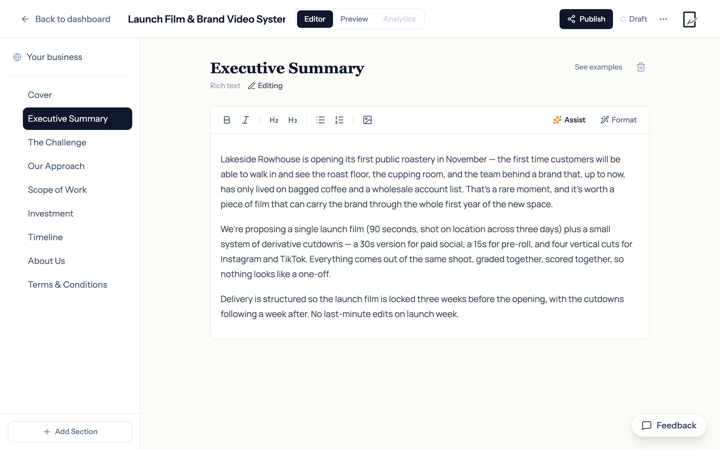
For many proposals, File -> Download -> PDF is enough. ProposalKit is for teams that want the browser version, signature, and follow-up signal attached to the same proposal link.
Clients do not need an account. They open the proposal, read it, and can accept from the page.
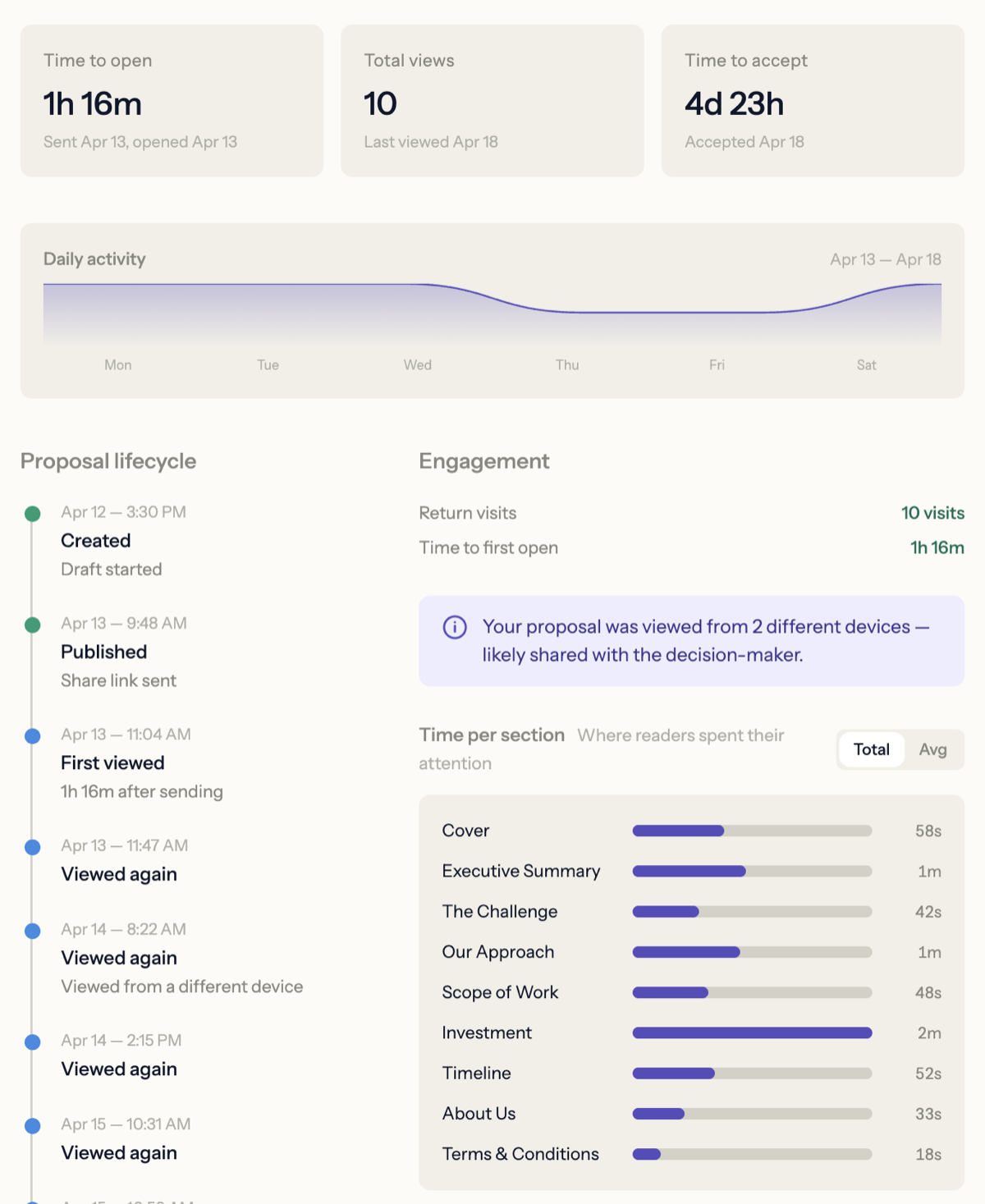
Tracking client views on the proposal link
Google Docs Activity Dashboard can show viewer information in Workspace. For agency-to-client proposals, the catch is simple: external view history depends on Workspace settings and the viewer's own privacy settings. It is useful, but it is not built around proposal follow-up.
ProposalKit tracks the client link directly. Internal review links are separate from client links, so teammate review does not affect client analytics.
Acceptance on the proposal page
Google eSignature is available for Workspace Individual and selected Workspace editions when enabled. If that solves the job, use it.
ProposalKit is different because acceptance sits inside the proposal page. The client can sign there, and the accepted proposal exports a signed PDF.

When to graduate from Docs
Keep Google Docs when a Doc or PDF fits the way the team sells. Use ProposalKit when the proposal needs to feel more like a branded client presentation than a file attachment.
FAQ
But Google Docs is free. Why pay for ProposalKit?
If Google Docs is already working and proposals are rare or simple, staying there is a rational choice. The cost appears when the proposal workflow repeats often enough that drafting, export, follow-up, and acceptance each become their own manual step. ProposalKit is for the point where the team wants the proposal, client link, analytics, and acceptance record in one place.
Is there a good Google Docs alternative for client proposals?
ProposalKit is a Google Docs alternative built specifically for client proposals. Instead of a Doc that doubles as the document and the share surface, the client gets a branded proposal page at the link, with in-page acceptance and per-link analytics attached.
Can I track when a client opens my Google Doc proposal?
Google Docs Activity Dashboard shows view information, but only when your Workspace settings and the viewer's own privacy settings allow it, which is uneven for external clients. ProposalKit tracks the client link directly, with separate review links so teammate views do not muddy the signal.
How do I send a Google Doc as a proposal?
Sharing the Doc link or exporting to PDF and emailing it both work. ProposalKit is for teams that want the proposal link to open a branded page with sign-in-place acceptance, instead of dropping the client into the Docs editor or a static PDF attachment.
Can we still draft in Google Docs?
Yes. Google Docs and exported PDFs can be fully client-facing. ProposalKit is strongest when the team wants the client-facing page, tracking, and acceptance flow to live together.
Do clients need a ProposalKit account?
No. Clients receive a proposal link, review it in the browser, and can accept from the page.
Does Google Docs eSignature make ProposalKit unnecessary?
For some teams, yes. If the only missing piece is a signature request and your Workspace plan includes eSignature, Google may be enough. ProposalKit is for teams that specifically want the proposal page, follow-up signal, and acceptance flow in one product.